
PR #5421 adds RichTextComponent, a read-only component for formatted application text. It supports headings, inline styles, lists, links, and images without embedding a web view.
A SpanLabel applies one style to wrapped text. A BrowserComponent renders a complete web page. RichTextComponent covers formatted document content between those two cases and participates in ordinary Codename One layout.
Rich text inside a scrollable container
A common screen mixes formatted text with buttons, images, forms, and other Codename One components inside one scrollable container. A BrowserComponent is a poor fit for that layout because it owns a rectangular native surface and its own page viewport. The browser’s document height does not naturally become the height of a child inside the parent Codename One layout.
RichTextComponent measures wrapped runs for the width it receives and reports the corresponding height. In the default SizeMode.SHRINK, it behaves like a SpanLabel: the parent container scrolls the rich text together with the surrounding components. SizeMode.SCROLL is available when the rich text should keep an assigned height and scroll its own content.
The read-only view and editor agree on paragraph attributes, inline styles, links, image runs, and wrapping because they do not maintain competing renderers.
Supply the format you already have
HTML is not the only input:
RichTextComponent view = new RichTextComponent();

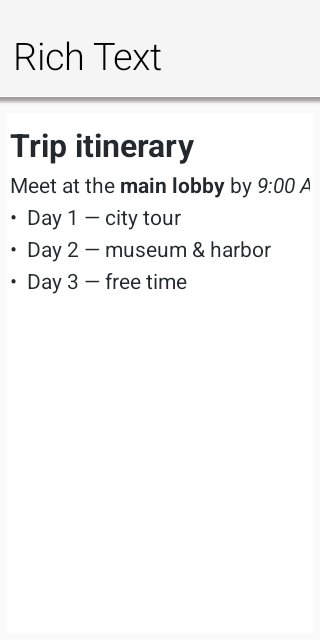
view.setMarkdown("# Trip summary\n\n"
        + "Departs **09:40**, arrives *11:15*. "
        + "See the [itinerary](app://itinerary).\n\n"
        + "- Window seat\n"
        + "- Carry-on only");

form.add(view);
setContent(...) accepts RichTextFormat.HTML, MARKDOWN, ASCIIDOC, or RTF. The model covers headings, emphasis, inline code, links, images, lists, quotes, literal blocks, paragraph alignment, indentation, foreground colors, and highlights.
You can also assemble content without markup:
RichTextComponent status = new RichTextComponent();
status.append("Status: ", TextStyle.DEFAULT)
      .append("confirmed",
              TextStyle.DEFAULT
                      .withBold(true)
                      .withForeColor(0x1a7f37));
This path is useful when the content already arrives as structured application data. It avoids generating markup only to parse it again.
Links are application actions
A link target does not automatically leave the application:
view.addLinkListener(e ->
        Display.getInstance().execute((String) e.getSource()));
The event source is the target string. An https: URL can open a browser. An app: target can navigate to another form. The application owns the policy.
Images follow the same rule:
view.setImageResolver(src -> imageCache.get(src));
The component does not create a second network stack or choose a cache lifetime. The resolver returns the image for a source string, or null for a placeholder. That keeps loading, authentication, and caching in application code.
The editor supports the same formats in both directions
RichTextArea now imports and exports HTML, Markdown, AsciiDoc, and a practical RTF subset through direct model adapters. Markdown and AsciiDoc do not convert through HTML first.
RichTextArea editor = new RichTextArea();
editor.setContent(
        "# Release notes\n\nThis is **ready**.",
        RichTextFormat.MARKDOWN);
editor.insertContent(
        "{\\rtf1\\ansi {\\i pasted notes}}",
        RichTextFormat.RTF);
editor.insertContent(
        "== Details\n\n* Portable\n* Lightweight",
        RichTextFormat.ASCIIDOC);
Editing and reading the same format returns canonical output for that format. It preserves supported meaning, not the original whitespace, tag aliases, or attribute order.
Rich clipboard data uses the same negotiation. A copy can publish plain text, HTML, RTF, Markdown, and AsciiDoc together. The receiving component chooses the richest format it understands. Ports with only a plain-text system clipboard still keep the richer payload for transfers inside the application.
The importer handles document markup, not web pages
The HTML importer does not execute scripts. It supports the markup that maps to the lightweight document model. It does not implement a CSS cascade, arbitrary DOM layout, forms, video, or embedded JavaScript.
| Content and layout | Label / SpanLabel | RichTextComponent | BrowserComponent |
|---|---|---|---|
| Simple text | ✓ Best fit | Works, but unnecessary | Works, but adds a browser |
| Mixed with other Codename One content | ✓ | ✓ | Separate browser surface |
| Child of a scrollable Codename One container | ✓ Participates in parent layout | ✓ Measures its content and participates in parent layout | Owns a separate viewport and scrolling surface |
| Simple HTML or formatted document content | Convert to plain or uniformly styled text | ✓ HTML, Markdown, AsciiDoc, and RTF | ✓ HTML |
| Complex HTML, CSS, forms, video, or JavaScript | ✓ |
Use RichTextArea instead when the formatted document must be editable.
Validate link targets and image sources as application data. A script-free importer prevents script execution; it does not make an untrusted URL safe to open.
The viewer and editor use the same painter
The June editor implementation used a web view by default. The editor and a read-only Codename One rendering could therefore disagree on wrapping, font metrics, or supported markup.
The new path keeps editing and display on the same model and RichRunPainter. A note can move from RichTextArea to RichTextComponent without crossing a browser serialization and rendering boundary.
Yesterday’s post described the operating system sending text operations into a portable document. RichTextComponent displays the same document model with the same painter and no editing session.
Try it where you currently use a BrowserComponent only to show formatted application text. Keep the browser for pages that are actually web content.
The last post in this week’s series covers compact strings in ParparVM. You can also start with free and local JavaScript builds, calendar synchronization, Bluetooth support, or pure Codename One text editing.
Discussion
Join the conversation via GitHub Discussions.