PR #5399 moves Bluetooth into the Codename One core and adds implementations for every target, including JavaScript. The API covers BLE central and peripheral roles, GATT, L2CAP, classic RFCOMM, simulator fixtures, and native desktop radios.
The old Cordova-derived cn1lib handled useful BLE cases on Android and iOS. The new implementation was written for Codename One and exposes the wider protocol surface through capability queries.
Each target supports the roles available from its operating system. Browsers do not expose classic Bluetooth or peripheral mode. iOS does not expose arbitrary RFCOMM. The API reports these limits instead of pretending every operation works everywhere.
Start with the role
Bluetooth is a family of protocols and roles:
| Role | What it does | Main targets |
|---|---|---|
| BLE central | Scan, connect, discover GATT, read, write, subscribe | Android, iOS, desktop, JavaScript |
| BLE peripheral | Advertise and serve a local GATT database | Android, iOS, simulator |
| L2CAP | Bidirectional byte streams with more throughput than GATT chunks | Android 10+, iOS 11+, simulator |
| Classic RFCOMM | Serial streams for printers, scanners, and industrial devices | Android, desktop, simulator |
| Native simulator backend | Drive the computer’s real Bluetooth radio | macOS, Linux, Windows simulator |
The entry point never returns null:
Bluetooth bt = Bluetooth.getInstance();

if (!bt.isLeSupported()) {
    hideBluetoothFeature();
    return;
}
There are matching queries for peripheral mode, L2CAP, and classic Bluetooth. A target without a role fails with the typed BluetoothError.NOT_SUPPORTED.
Scan, connect, then discover
This scan looks for the standard Heart Rate service and a device name beginning with Polar:
Bluetooth bt = Bluetooth.getInstance();
bt.requestPermissions(
        BluetoothPermission.SCAN,
        BluetoothPermission.CONNECT
).onResult((granted, permissionErr) -> {
    if (permissionErr != null || !granted) {
        return;
    }

    ScanSettings settings = new ScanSettings()
            .addFilter(new ScanFilter()
                    .setServiceUuid(BluetoothUuid.fromShort(0x180D))
                    .setNamePrefix("Polar"));

    BleScan[] scan = new BleScan[1];
    scan[0] = bt.getLE().startScan(settings, sighting -> {
        scan[0].stop();
        sighting.getPeripheral().connect()
                .onResult((peripheral, connectErr) -> {
            if (connectErr == null) {
                peripheral.discoverServices();
            }
        });
    });
});
Filters inside one ScanFilter are combined with AND. Several filters in ScanSettings are combined with OR. Several scans can run at once, and the native scan stops when the final handle stops.
GATT operations return independent AsyncResource values. The implementation serializes them through one queue per peripheral because platform stacks allow one in-flight request per connection. A missing platform callback times out instead of wedging every later operation.
Web Bluetooth supports central GATT
On the JavaScript port, startScan(...) opens the browser’s device chooser. The chooser uses your filters and returns the one device the user selects.
That call must happen from a user gesture, normally a button action. It requires HTTPS in a Chrome-family browser. The browser does not provide RSSI, repeated advertisement sightings, classic Bluetooth, L2CAP, or the peripheral role.
The same Java central-role code can still connect, discover services, read, write, and subscribe. The browser owns the permission prompt and device selection.
Display.getPlatformName().equals("js") tells you where the app runs. isPeripheralModeSupported() tells you whether the operation you need can work.
The simulator can fail on command
Hardware tests fail in the least convenient places. A device disappears between scan and connect. A GATT read never calls back. The radio turns off after a screen opens. Reproducing those cases with a physical sensor is slow.
The simulator now has a virtual Bluetooth stack:
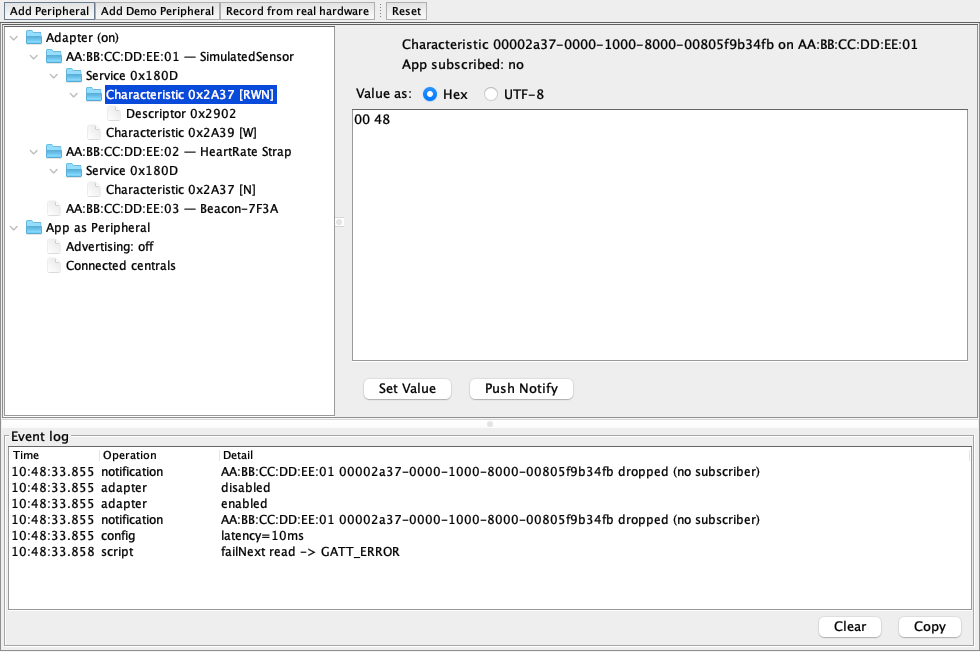
You can stage peripherals, edit characteristic bytes, delay every callback, disconnect a device remotely, and arm the next scan, connect, read, write, discover, or subscribe operation to fail with a selected BluetoothError.
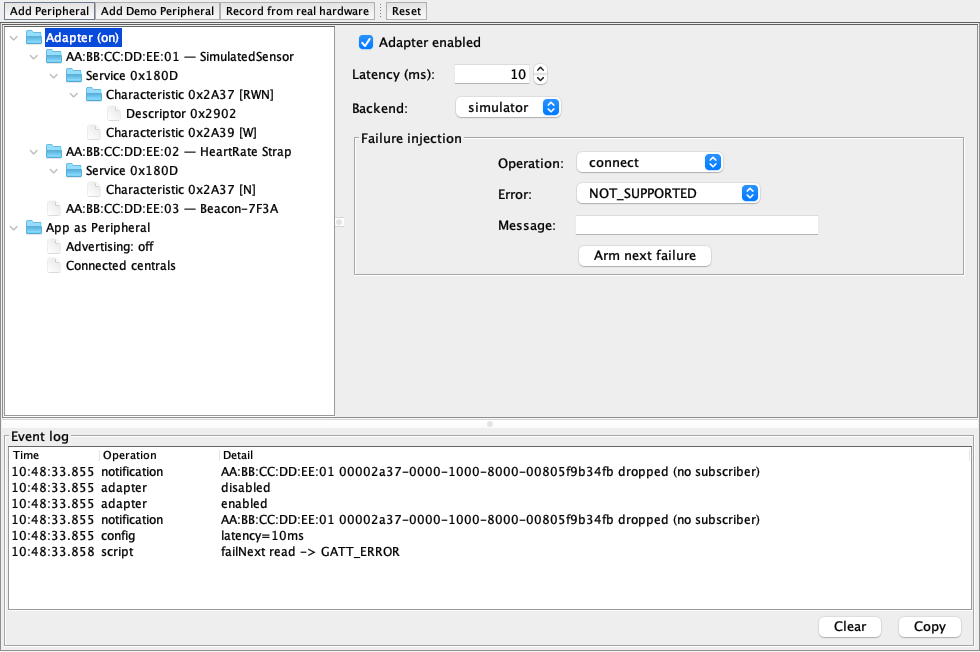
Portable tests can drive the built-in demo device without importing simulator classes:
CN.execute("bluetooth:item2"); // add SimulatedSensor
CN.execute("bluetooth:item3"); // send a notification
CN.execute("bluetooth:item8"); // fail the next GATT read
The native simulator backend takes the other route. It loads a Rust btleplug library and drives the host computer’s real radio through CoreBluetooth, BlueZ, or WinRT. That gives you real central-role traffic without leaving the Codename One simulator.
Record and replay connects the two. A fixture capture scans real devices, records advertisements and GATT data, scrambles device identities, and saves JSON. The virtual stack can replay the timing and RSSI changes later in CI.
The builder injects only the roles you use
Referencing com.codename1.bluetooth is the build signal. The builders inspect which packages and types the application uses:
- A central-only Android app does not receive advertise permissions.
- A BLE-only app does not declare classic Bluetooth hardware.
- An app with no Bluetooth references gets no Bluetooth manifest, plist, framework, or native code changes.
This matters because modern Bluetooth permissions are not one checkbox. Android separates scan, connect, and advertise. iOS requires a reason string and has different background modes. Beacon applications must also opt out of Android’s default neverForLocation declaration or Android 12+ can filter advertisements used for location.
The generated defaults get a build through the toolchain. Your application still needs a specific privacy explanation for Apple review.
Streams still block
Callbacks, scan results, notifications, and adapter changes arrive on the Codename One event dispatch thread. RFCOMM and L2CAP streams are the exception. Their reads and writes block, so they belong on a background thread.
Addresses have another limit. Android and desktop may expose a MAC address. iOS returns a CoreBluetooth identifier scoped to the application. Persist the value for reconnection on the same install, but do not treat it as a portable hardware identity.
The core API replaces the old cn1lib for new applications. It supports a wider set of Bluetooth roles, lets tests reproduce failures without a physical device, and keeps unused native pieces out of the build.
Tomorrow’s post covers pure Codename One text editing without native overlays.
Discussion
Join the conversation via GitHub Discussions.